THRIVE Latest Update: ‘Missed List’ & ‘No List’ management
THRIVE, Inform People’s lightweight tool for productivity tracking, has received a new update. Relevant mostly to Admin users; those who manage schedules in advance and access multiple rooms in a department through the Room Monitor view. This update has been designed to give administrative teams simple ways to add reasons to unutilised sessions and eventually use that data to identify trends and opportunities for capacity improvement.
Part of our ongoing discussions with THRIVE users is about tracking situations where whole rooms and their sessions, in which there was an opportunity for a whole list of procedures to take place, were lost. This could be a result of a whole host of reasons; where either there was No List planned at all or a list was Planned but became a Missed List. Rather than assigning blame, it is about putting a process in place to aid understanding what really happens, to find ways to mitigate issues, and maximise potential in the NHS.
For many departments, understanding lost capacity has historically been a challenge. Whether a list was cancelled at the last minute due to staff illness or was never scheduled due to planned building maintenance, these gaps often remained invisible in standard activity data. Without visibility, you cannot expect to recover capacity. Hence: Missed Lists and No Lists.
Visual Updates
OLD VIEW

NEW VIEW
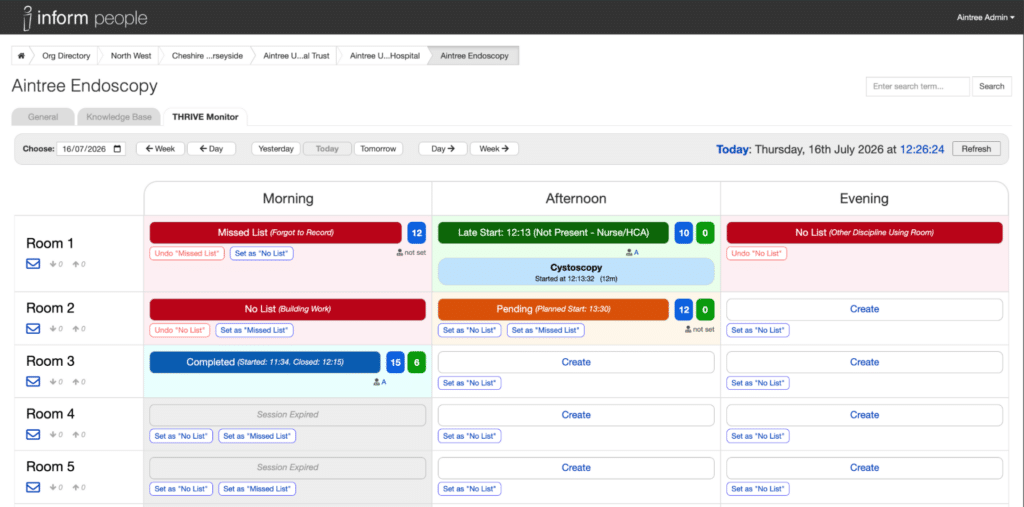
This update includes:
-
- Making the Room Monitor full screen by default
-
- Addition of quick links for marking up Missed Lists or No List
-
- Colour coding
-
- Visibility of Point (or time) Goals and Totals
-
- Reasons shown once picked
There is now more information and active choices available on this page, but all in the pursuit of long term clarity.
Importantly, there is no impact on the Room Accounts that the majority of THRIVE users interact with. Their Stop/Start and list building options remain the same. They will see (if they look!) if an old list is classed as Missed but they are not able to set these or edit them.
Also, if a room has been marked as No List but then the room needs to be used, the Room User is NOT able to unlock it but if they ask the Room Monitor / admin it is a matter of a single click to free it back up to build a list.
Start with the Why…
Efficiency. Productivity. Funding. Any one of these could be the inspiring factor for getting THRIVE up and running. Having a baseline means you have a source of truth and proof for funding applications, staffing requests and beyond.
Once marked up, Missed List reasons have extra power. We can start to apply a range of analytics to discover regular reasons for disruption and lost opportunities. These can then inform change to processes and eventually it will lead to getting more done.
Units can move beyond measuring activity alone and begin identifying the underlying causes of lost capacity.
It is not possible to recover capacity if you cannot see the whole picture. With clear data on list utilisation and the reasons behind lost capacity, managers can build stronger business cases and target improvement work where it will make the most difference.
What to expect next.
As the tool launches, the THRIVE team will be on hand to make sure everything runs smoothly. From there, we will give units time to settle in with the new features. Reporting will follow in early Autumn, with previews going out to some units as early as August.
If you need to talk to us in the meantime, you can always reach out to support@informpeople.com